E-Tray and In-Tray Exercises (and Error-Checking Tests)
How They Work and How to Prepare
An e-tray exercise drops you into a simulated inbox of emails, attachments and meeting requests and asks you to prioritise, decide and reply against the clock; an in-tray is the paper version. The formats (choose, rank, write), timings, a prioritising method that works and the error-checking tests that often sit beside them.
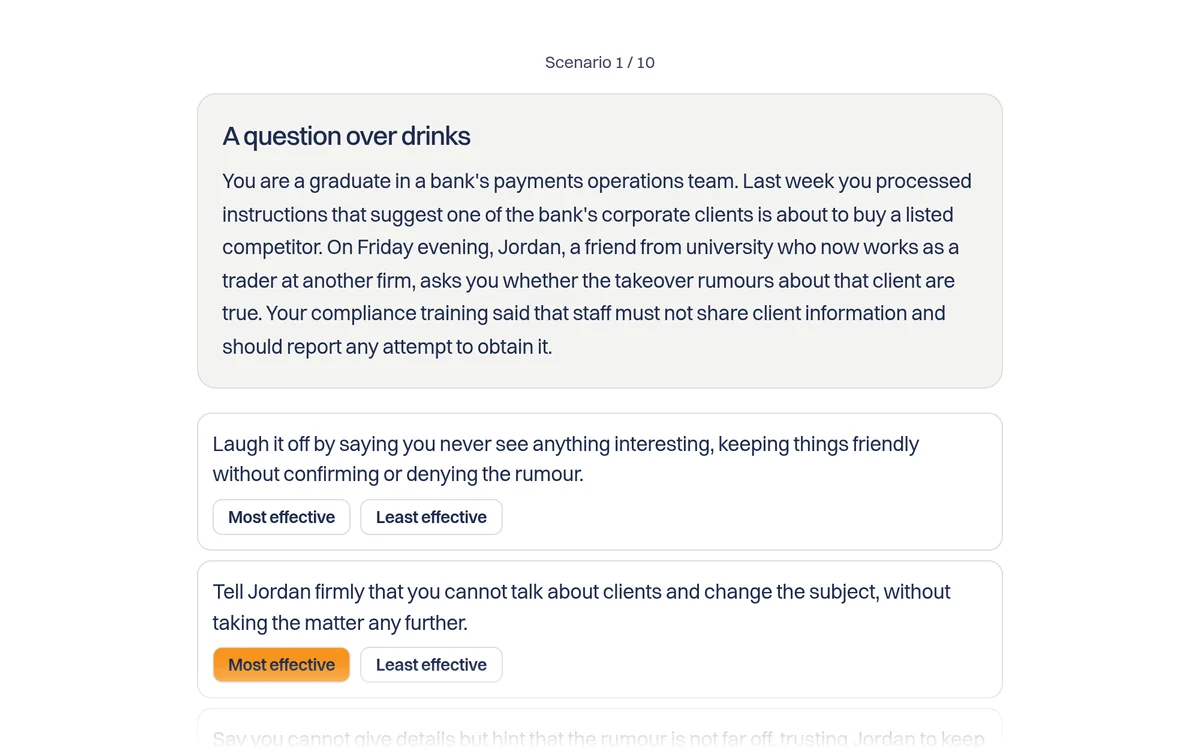
An e-tray exercise puts you in a simulated job with an inbox full of emails, attachments, meeting requests and chat messages, and asks you to prioritise them, make decisions and reply within a set time; an in-tray exercise is the same task on paper. LSE's careers service sums it up as "computer-based" versus "paper-based" versions of one task (LSE Careers). TARGETjobs puts the usual length at "30 minutes to 80 minutes" and lists the answer formats: choosing a response from a multiple-choice list, ranking responses from most to least effective, prioritising a to-do list with reasons, or writing an email (TARGETjobs). There is rarely one right answer; assessors score how you prioritise and justify. The multiple-choice and ranking items are situational judgement in an inbox, which our free situational judgement test trains. Further down: error-checking tests, the short timed "spot the difference" tests that often come with clerical and administrative e-trays.
E-tray exercise at a glance
| What to expect | |
|---|---|
| Setting | Background on a fictional organisation and your role, then a scenario: back from holiday to a full inbox, or covering for a colleague (LSE) |
| Materials | Emails with attachments, meeting requests, instant messages (e-tray); memos, letters, reports, diaries (in-tray) |
| Answer formats | Pick a response, rank responses, prioritise a list with reasons, write replies (TARGETjobs) |
| Length | Usually 30 to 80 minutes |
| When | Typically at an assessment centre, sometimes earlier as an online job simulation |
| What is scored | Prioritising, decisions under time pressure, analysis, written communication, commercial awareness |
What an e-tray exercise looks like
You open the exercise to a briefing: who you are, who your manager is, what the organisation does. Then the inbox. Some messages are urgent, some are important, some are both, a few are neither, and several are connected: a client complaint in one email explains a budget question in another, and two meetings clash. New messages may arrive while you work. Depending on the format, you then:
- choose the best action for an email from a list;
- rank four or five possible actions from most to least effective;
- sort the whole inbox into an order, with a reason for each decision; or
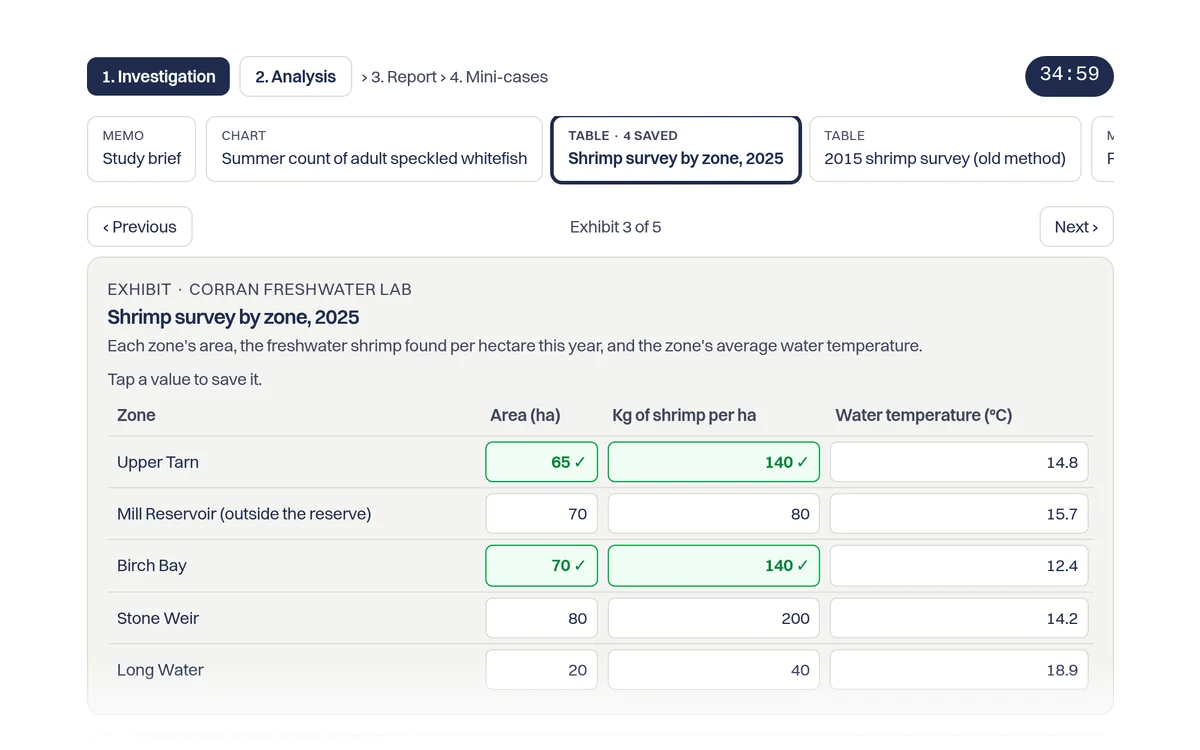
- write replies, briefings or a recommendation, sometimes using figures from an attachment.
LSE lists the tasks you may be asked to do: decide what needs doing, "by whom, when, and why", delegate to the right person, analyse budgets or sales figures, brief or recommend actions to a superior, and draft replies (LSE).
How e-tray exercises are scored
LSE lists what these exercises assess: absorbing information quickly and accurately, prioritising, planning and deciding under time pressure, time management, quantitative and qualitative analysis, written communication and commercial awareness. Two of its points matter for strategy:
- "There is no single right answer." Clear, logical reasons for each decision earn the marks.
- Finishing first earns nothing extra, but leaving tasks incomplete loses points.
In multiple-choice and ranking formats, your choices are compared with a key, as in any situational judgement test, so close answers usually earn partial credit.
A prioritising method that works
- Read the briefing and every item before acting. LSE suggests no more than 15 minutes of reading for a 90-minute task; scale that down for shorter ones.
- Link items as you read. Note clashes, dependencies and anything that changes the meaning of another message.
- Sort by four questions for each item: who sent it, when is it due, what happens if it waits, and does it have to be done by you?
- Decide one of four actions: act now, delegate, schedule, or drop. TARGETjobs frames it the same way: act, delegate, delay or drop.
- Separate urgent from important. A quick, urgent, minor task can be done first because it takes a minute; an important task with a later deadline still needs a slot today.
- Handle missed deadlines honestly: apologise or ask for an extension rather than ignoring them, if the item matters.
- Stay inside the information given. LSE's advice: don't make assumptions beyond it.
- Write like it is real. Short, polite, specific replies. Proofread; a spell checker will not catch the wrong name.
A short example (written for this guide)
Three items arrive at 9:00: (a) your manager asks for sales figures for a board paper due at 11:00; (b) a client complains that an order is late and asks for a call today; (c) a colleague asks you to book a team lunch next week. A sensible order: reply to the client now with a time for a call (quick, urgent, reputation at stake), pull the figures for (a) next (important, hard deadline), and leave (c) for later or delegate it. The reasons you give for that order are what the assessor reads.
Who uses e-tray and in-tray exercises?
Neither publishers nor careers services keep a list of employers. What they do say is where the exercise sits: usually at an assessment centre, sometimes earlier "as part of an online application, as an online ability test or job simulation", and virtual assessment centres often use the e-tray version (TARGETjobs). LSE adds that they are sometimes run as group exercises. TARGETjobs and the University of Sheffield's careers guide both point to Civil Service Fast Stream practice material as an example of an e-tray; the current Fast Stream online tests are different, as our Fast Stream guide explains. Ordinary Civil Service job adverts use the Civil Service online tests instead, though departments may add written exercises at interview. Employers increasingly fold inbox-style tasks into longer online assessments (Deloitte's Job Simulation and HSBC's scenario assessment both include written responses); our degree apprenticeship online assessment guide lists what each big employer sends.
Error-checking tests
Error-checking (or "checking") tests are short, strictly timed tests where you compare two versions of information, such as names, codes, addresses or table rows, and spot where they differ. They are common for clerical, administrative, customer service and data-handling roles, and some publishers put them in their entry-level batteries:
| Publisher | Test | What it involves |
|---|---|---|
| Saville Assessment | Error Checking (Comprehension range) | Free timed practice on Saville's site (Saville practice tests); see our Saville guide |
| Korn Ferry / Talent Q | Checking (Aspects) | "Comparing information in two tables to decide whether it is the same" (Korn Ferry); 46 items, up to 8 minutes, adaptive (technical review, PDF); see our Korn Ferry guide |
| SHL | Checking Information | Listed among SHL's free practice tests (SHL) |
| Thomas International | GIA Perceptual Speed | Count how many letter pairs match, ignoring case; part of the five-task GIA; see our Thomas GIA guide |
How to get faster at error checking
- Compare in chunks. Read three or four characters from one side, then the same from the other, rather than whole lines.
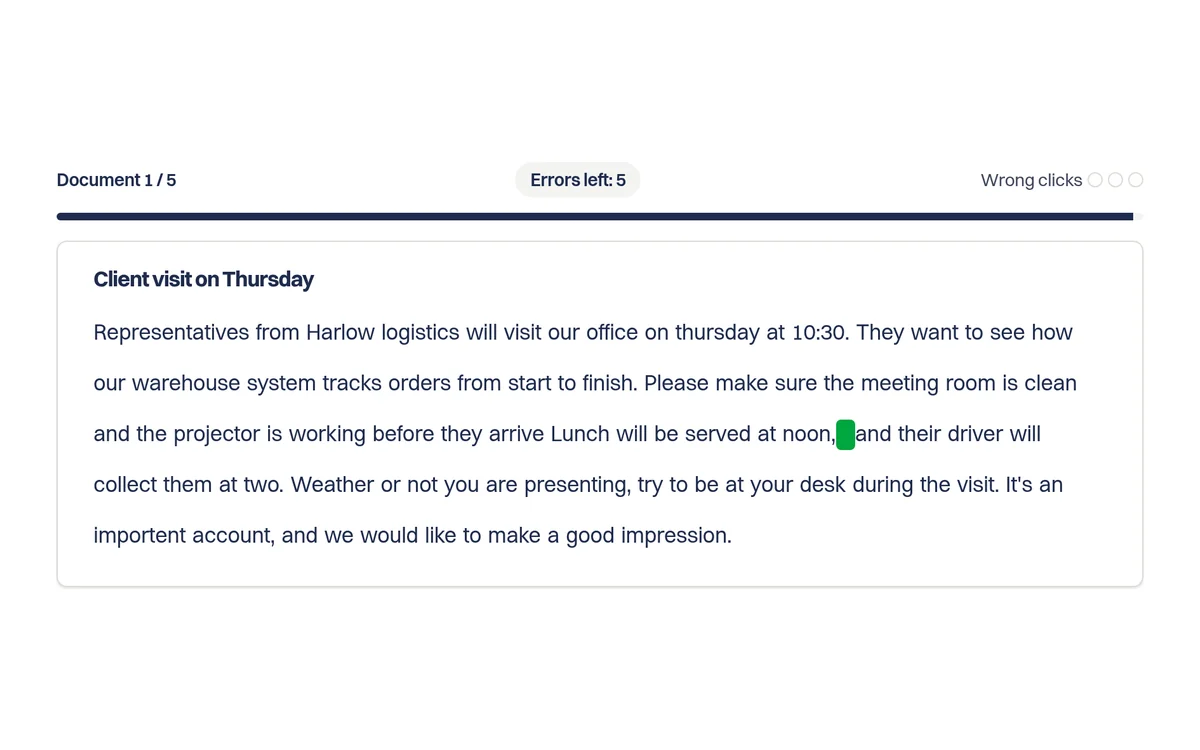
- Know the usual traps: swapped digits (1987 / 1978), similar letters (O and 0, l and 1, rn and m), double letters, and spacing or punctuation differences.
- Do not re-check items you have already passed unless the test lets you go back and time is left.
- Accuracy first, then speed. In adaptive versions such as Korn Ferry's, a wrong answer moves you to easier items.
We have no direct copy of a two-column checking test. The closest GamePrep practice for the same exact-reading habit is our proofreading test (click every error in short documents under a clock; see the Proof It guide) and the data entry test (copy records fast and exactly; see the data entry guide).
Free practice
- Inbox judgement (choose or rank actions): our situational judgement test.
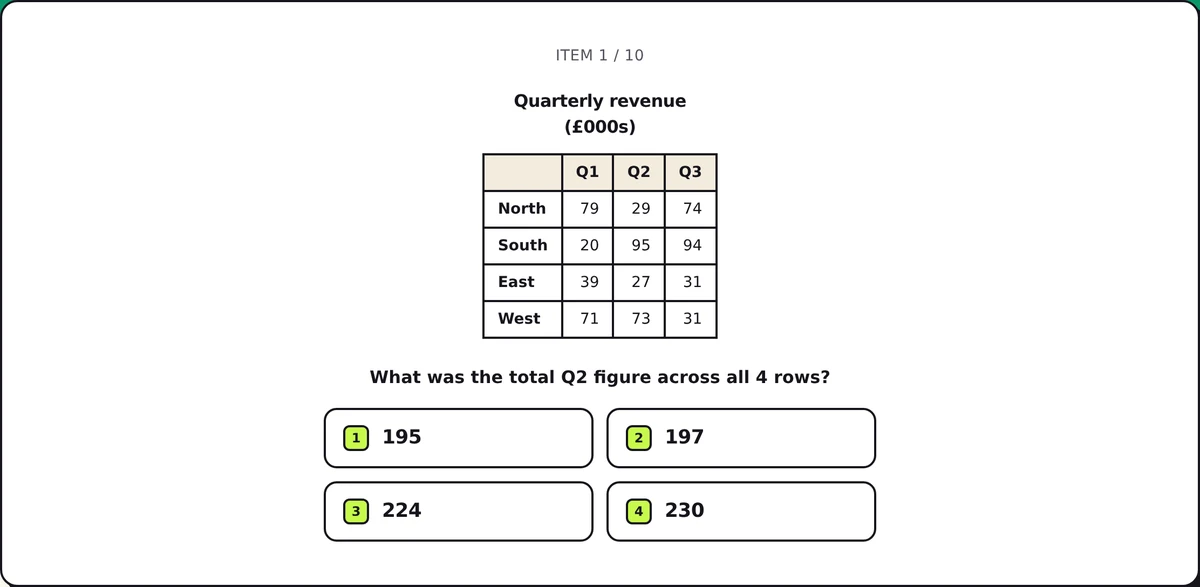
- Working from documents and figures under a clock: our research case study game and numerical reasoning test.
- Accuracy and checking: the proofreading test and data entry test.
- Employer and university practice e-trays: check your invitation and your university careers service, many of which run mock assessment centres.
FAQ
What is an e-tray exercise? A timed online simulation in which you play a role and work through an inbox of emails, attachments and meeting requests, prioritising them, making decisions and sometimes writing replies. It tests prioritising, judgement, analysis and written communication.
What is the difference between an e-tray and an in-tray exercise? Only the medium. An e-tray is computer-based, with emails and calendar items; an in-tray is paper-based, with memos, letters and printed documents. The tasks and the skills assessed are the same.
How long is an e-tray exercise? Usually between 30 and 80 minutes, depending on the employer and the format. Your invitation or the assessment centre briefing will say.
Is there a right answer in an e-tray exercise? Rarely a single one. In written formats you are scored on the quality of your priorities and reasons; in multiple-choice and ranking formats your answers are compared with a key, and close answers often earn partial credit.
What is an error-checking test? A short, strictly timed test in which you compare two versions of information, such as codes, names or table rows, and decide whether they match or where they differ. Saville, Korn Ferry and SHL all publish practice versions.
Is GamePrep affiliated with any employer or test publisher named here? No. GamePrep is independent and not affiliated with any employer, university or test publisher mentioned on this page. Our practice tasks are original.
GamePrep is an independent practice site and is not affiliated with, endorsed by or connected to any employer, university careers service or test publisher named on this page.